Skip to product information
1 of 1

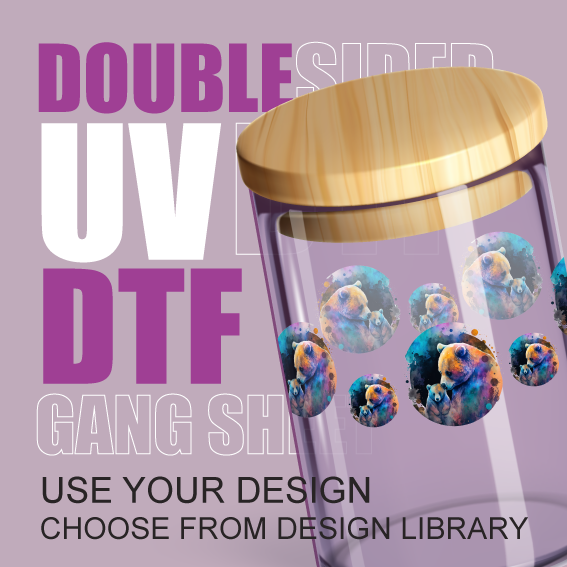
DOUBLE SIDED UV DTF TRANSFERS (STICKERS) - BUILD YOUR GANG SHEET

DOUBLE SIDED UV DTF TRANSFERS (STICKERS) - BUILD YOUR GANG SHEET

Regular price $30.77
Regular price Sale price $30.77
Sale Sold out
Shipping calculated at checkout.
Size

Required spec for printing

  • Resolution: 300dpi
  • Transparent background
  • Images must be trimmed tight. No outside artboard space.
  • The image must be the exact size you expect to be printed.
  • Do not reverse / mirror the image.
  • Avoid translucent design.
  • Minimum line width .5mm
  • Exact color accuracy cannot be guaranteed.
  • There may be slight variations in color for repeat orders.
  • Files Accepted PNG
  • Anti-aliasing: OFF/None on export.
View full details

🎨 Artwork Preparation Guide: Avoiding White Outlines in DTF Printing 🎨

A simple guide to ensure your design prints perfectly clean, crisp, and without unwanted borders.

The Problem: Anti-Aliasing and the White Underbase

DTF (Direct-to-Film) printing requires a base layer of white ink—called the white underbase—to be printed behind all your colors. This ensures your vibrant artwork shows up clearly on any garment color.

The key is to make sure every edge pixel of your design is 100% opaque (solid color) or 100% transparent (nothing there).

How the white outline happens:

  1. When you convert vector art to a PNG, your software uses a process called Anti-Aliasing to smooth out edges and curves.
  2. Anti-aliasing works by adding tiny, semi-transparent (partially opaque) pixels along the edge, making the design fade into the background.
  3. Since these pixels are partially transparent, they still tell the printer to lay down the white underbase underneath them, but because they hold little to no actual color data, they print as faint white dots or a white halo.

The Solution: Disable Anti-Aliasing on Export

To prevent the white fringe, you must turn off the anti-aliasing feature when you create your final PNG file.

Adobe Illustrator

Method 1: Exporting to a PNG

  1. Go to File > Export > Export As... or Save for Web (Legacy).
  2. Choose PNG (.png) as the file format.
  3. In the export settings window, set Background Color to Transparent.
  4. CRITICAL STEP: Find the Anti-aliasing setting and change it from "Art Optimized" or "Type Optimized" to None (or Off).
  5. Click Export/Save.

Method 2: Pasting into Photoshop

  • Copy your vector artwork from Illustrator.
  • In Photoshop, go to Edit > Paste.
  • CRITICAL STEP: When the Paste dialog appears, select Pixels and UNCHECK the box next to Anti-aliased.
Adobe Photoshop

When Using Shapes or Text

  • For the Text Tool, look at the Options Bar (top) and change the Anti-aliasing setting from "Strong" or "Sharp" to None.
  • For Shape Tools or Selection Tools, ensure any "Feather" or "Anti-aliasing" options are turned off or set to a value of 0.

When Saving the Final File

  • Go to File > Save As or File > Export > Export As.
  • Save your file as a PNG with Transparency enabled.
  • CRITICAL CHECK: Always zoom in on your final PNG before sending it to ensure the edges are sharp.
CorelDRAW

Exporting to a PNG

  1. Go to File > Export (or press $Ctrl+E$).
  2. Choose PNG - Portable Network Graphics as the file type.
  3. Click Export. This opens the Export PNG dialog box.
  4. On the Settings or General tab: Verify Transparency is enabled.Find the Anti-aliasing option.
  5. CRITICAL STEP: Make sure the Anti-aliasing checkbox is UNCHECKED (it must be off).
  6. Click OK/Export.

Quick Checklist for Perfect Artwork

  • Format: PNG (with transparent background).
  • Resolution: 300 DPI (Dots Per Inch) or higher.
  • Anti-aliasing: OFF/None on export.

Double-Sided UV-DTF Decals: Twice the Impact, Zero Hassle

The Next Evolution in High-Durability Custom Branding

Looking for a way to make your branding pop from both sides of the glass? Our Double-Sided UV-DTF Decals are the ultimate solution for retail storefronts, vehicle windows, clear glass tumblers, and clear acrylic displays. Available exclusively at DTF Prints Canada, these premium transfers offer vibrant color and sharp detail on both the front and back, ensuring your message is never missed.

Traditional stickers often leave you looking at a blank adhesive back. Our double-sided technology uses a multi-layer printing process that keeps your artwork opaque and brilliant from every angle.

Why Choose Double-Sided UV-DTF?

When you need premium quality that stands up to the elements while providing a professional look, nothing beats UV-DTF.

  • Two-Way Visibility: Perfect for glass doors and windows—read your logo from inside and outside.
  • Ultra-Strong Adhesive: Bonds instantly to hard surfaces like glass, metal, plastic, and ceramics.
  • No Heat Required: Unlike traditional DTF, these are "peel-and-stick." Just apply pressure and peel the carrier sheet.
  • Weather & Scratch Resistant: Engineered to withstand UV rays, rain, snow, and heavy handling without fading or peeling.
  • Professional Finish: Raised, slightly textured ink gives your brand a high-end, embossed feel.

Fast Turnaround. Cheap Wholesale Pricing. Premium Results.

We know that in business, time is money. We’ve optimized our production right here in Ottawa to give you the best of both worlds: cheap, competitive pricing and the fastest turnaround times in Canada.

Minimum Order: Just 1 sheet (No setup fees!).

Durability: Waterproof, UV-protected, and scratch-proof.

Application: Hand-applied, no heat press or machinery needed.

Shipping: Fast local pickup in Ottawa or fast turnaround shipping.

Build Your Double-Sided Gang Sheet Online

Maximize your budget by using our intuitive Online Gang Sheet Builder. Load up a single sheet with multiple logos, window signs, or product labels to get the most value for your spend.

  1. Upload Your Files: Simply drag and drop your high-res PNG files.
  2. Layout with Ease: Use our AI-assisted tools to nest your designs and reduce waste.
  3. Fast Production: Once you hit submit, our team in Ottawa gets to work immediately to ensure your order ships out fast.

Frequently Asked Questions

Q: Do I need a heat press for Double-Sided UV-DTF?

A: Not at all! These are pressure-sensitive transfers. Simply peel, stick, rub, and remove the film.

Q: How fast is "Fast Turnaround"?

A: Most orders are processed and ready for shipping or local Ottawa pickup within 24–48 hours.

Ready to upgrade your glass branding?

Start Building Your Double-Sided UV-DTF Gang Sheet Now